Skip to content
ENRU
Explore our workITtector concept · 2026
Documents / AI

Dossier: AI reads the invoices, a person signs off

A document-processing concept combining field extraction, human review, and accounting-system export.

Watch the demo
Before

The accounting team gets dozens of invoices a day and retypes the details by hand. One wrong digit can mean hours of emails to sort it out.

After

We designed a service where the document is uploaded, the fields are filled in automatically, and a person only checks the ones the AI isn’t sure about.

From a scan to a line in the books

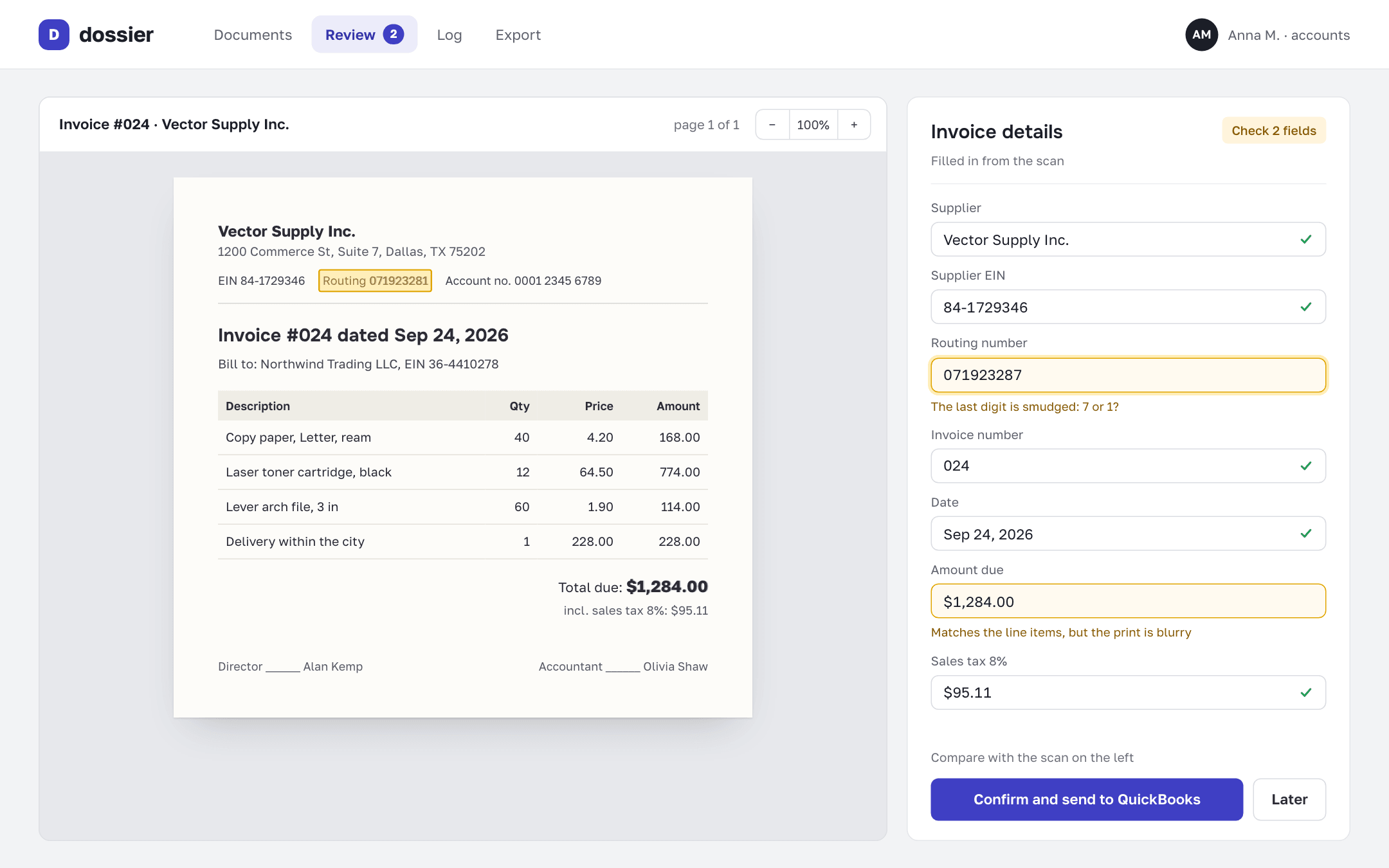
  1. The user picks a sample invoice, and it opens next to the form.

  2. The supplier, EIN, amount and date are already filled in. Doubtful fields are flagged, and the spot to check is highlighted on the scan.

  3. A person fixes the doubtful values and confirms. The data goes to accounting along with a record of who checked what.

More product screens

01 / 04

Panel · document queueEvery incoming invoice and delivery document with its status and amount: people only get the ones where it has doubts.

Decisions

  1. Only doubtful fields are flagged

    The model scores every value and only shows people the ones it isn’t sure about.

    Why we chose this

    The reviewer only spends attention where it’s needed.

  2. Highlights on the document

    Click a field and you see where on the page the value came from.

    Why we chose this

    Checking a value takes seconds, with no need to read the whole document.

  3. Review log

    It records who corrected what, and when.

    Why we chose this

    A person stays responsible for the result, and you can see and count the model’s mistakes.

How the product looks

A light grey work surface, violet for the AI’s suggestions, and clear, easy-to-read numbers.

Light grey + indigo

Under the hood

A language model (LLM) extracts the fields, then the code checks the format of each value. Highlights are drawn over the document, and data goes to accounting through an API.

Technologies
  1. LLM
  2. OCR
  3. SVG
  4. API
  5. Postgres

Your project could be next

Tell us what you need, and we’ll show you how it could look.

TelegramWhatsApp
Where to reply
What you’re interested in
Project estimate

Send us your project

Describe the job in your own words and attach whatever you have: a brief, mockups, spreadsheets or a link to your site. We’ll take a look and tell you roughly what it could cost and where it makes sense to start.

Files

Drop files here or PDF, Word, Excel, PowerPoint, TXT, PNG, JPG, WEBP. Up to 5 files, 20 MB in total
Where to reply

@ittector+66 97 931 4669ittector@gmail.com